Fantasy Room Level 109 - Photography Studio
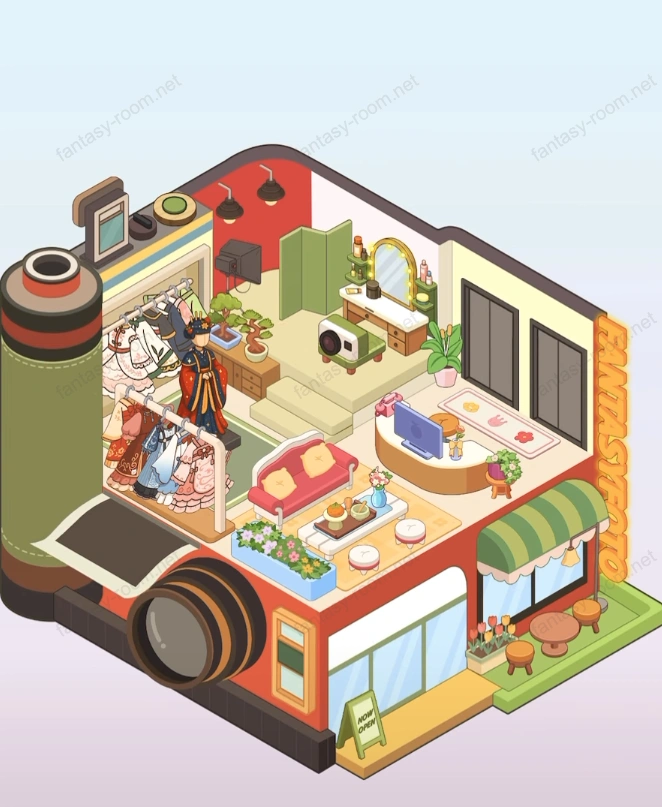
Arrange a creative photography studio with built-in giant camera. Inside has dressing area, photography studio, seating area, and a small table for editing photos. - Fantasy Room Level 109 Strategy & Solutions
Important Notice
Due to level number adjustments in the app and different update progress between iOS and Android platforms, the text guide below may not match the images and videos above. Please prioritize images and videos. If you find that the guide content doesn't match your current level, please visit View All Level Walkthroughs to find the correct guide through images. Thank you for your understanding.
This level themed "Photography Studio", overall shape uses giant camera as building main body, symbolizing art and recording life space. Indoor combines shooting, makeup, rest and display four major functional areas, overall style modern and refined, colors mainly orange-red and light wood color, with fashionable urban warm atmosphere.
Step 1: Build camera appearance and building foundation
Keep default red-orange main body wall and green exterior structure, install giant lens shape on left side, as building iconic appearance. Door and windows use floor-to-ceiling glass design, enhancing space transparency.
Step 2: Arrange facade and signboard area
Lay orange-yellow floor tiles at entrance, install "FANTASTUDIO" word three-dimensional signboard. In front of door place green-white sun shade, small round table and flower pots, creating pleasant waiting rest area.
Step 3: Build reception and rest area
Indoor front part set reception counter and sofa coffee table. Coffee table place coffee cups, magazines and fresh flowers, forming relaxed reception atmosphere. Behind counter hang decorative paintings and spotlights, enhancing art feeling.
Step 4: Arrange shooting area and scene props
Left side as main shooting area, install clothes rack and scene background wall. Hang multiple gowns and costumes, and place photography lighting and background curtain, making space more professional atmosphere.
Step 5: Add model and photographer character embellishment
Arrange model and photographer shape in shooting area, model wearing stage costume, photographer holding camera aiming at character, enhancing interactivity and dynamism.
Step 6: Arrange makeup and styling table
Stair upper floor space arrange as makeup room, install circular makeup mirror and light strip, tabletop place cosmetics, brushes and jars. Beside place green plants and storage cabinet, maintaining tidiness.
Step 7: Decorate upper floor storage and work corner
Upper floor right side set storage cabinet and washing machine, providing organizing and cleaning function for shooting costumes. Cabinet top place luggage and shooting props, making space more life-like.
Step 8: Add shooting auxiliary equipment and details
Photography studio can place tripod, light stand and prop basket. Ground use light gray non-slip tiles, forming contrast with orange-red wall, strengthening professional atmosphere.
Step 9: Perfect lighting and layer design
Upper floor use warm white lighting, shooting area match cold light reflection, forming layer contrast. Spotlights focus on character area, highlighting protagonist atmosphere.
Step 10: Overall balance and color optimization
Maintain orange-red, beige, green three colors proportion coordinated. Reception warm, shooting area calm, makeup area soft, forming complete visual layers.
Tips
- •Shooting area should maintain open, avoid too many ornaments affecting space perspective feeling.
- •Reception area and makeup area must maintain certain distance, avoid picture chaos.
Warnings
- ⚠Lighting direction needs to be accurate, main light should cast toward character center.
- ⚠Model and photographer face toward stage center, avoid visual conflict.
- ⚠Reception coffee table and decorative flowers should not be too high, to avoid blocking sight.