Fantasy Room Level 123 - Underwater Aquarium
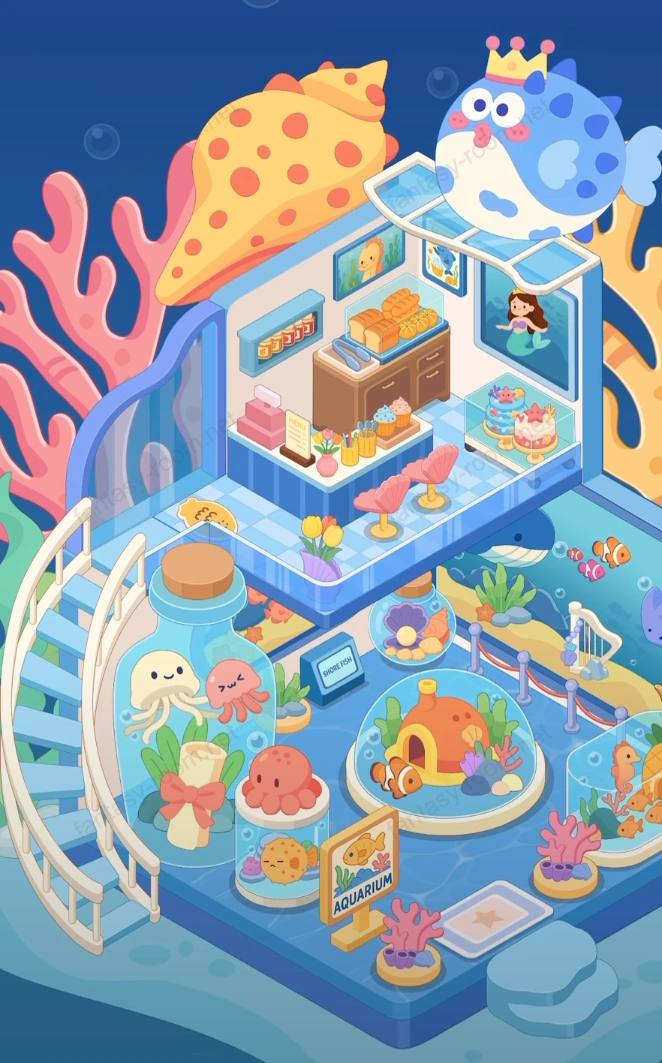
This level theme is dreamy and full of healing atmosphere "Underwater Aquarium". Players will create wonderful aquarium integrating display, leisure and education in this space surrounded by corals, bubbles and cute marine creatures. Overall picture like sinking into underwater dream, orange-blue color matching sharp contrast, bringing out gentle ocean light feeling. Huge pufferfish and shell decorations embellish on building top, symbolizing "Sea Kingdom" guardians. Keywords can include: underwater world, aquarium theme, coral decoration, dreamy blue space, cute marine creatures, parent-child interactive hall. - Fantasy Room Level 123 Strategy & Solutions
Important Notice
Due to level number adjustments in the app and different update progress between iOS and Android platforms, the text guide below may not match the images and videos above. Please prioritize images and videos. If you find that the guide content doesn't match your current level, please visit View All Level Walkthroughs to find the correct guide through images. Thank you for your understanding.
Underwater Aquarium uses upper and lower two-story structure design, lower floor as display area, upper floor as rest and sales area. Blue glass floor and arc stairs connect entire space, visual layers distinct. Various corals, seahorses, jellyfish and tropical fish embellish among, making entire room full of vitality and childlike fun. Upper floor dessert and beverage counter combines ocean theme, bringing unique "underwater café" experience.
Step 1: Build glass structure and aquarium framework
Keep default blue translucent structure, forming dreamy space like underwater world.
Step 2: Lay blue floor and arc stairs
Place white arc stairs on left side, connecting upper and lower two floors, adding fluidity to overall.
Step 3: Arrange lower floor display area foundation
Place large circular fish tank and fence in bottom floor center, as aquarium main display area.
Step 4: Add coral and seaweed decoration
Plant pink, blue corals around fish tank, and arrange seaweed and underwater rocks, creating natural ecological atmosphere.
Step 5: Place main fish tank and small fish house
Place orange small house and tropical fish in central fish tank, forming core viewing point.
Step 6: Place jellyfish and octopus models
Set transparent display bottles in foreground, put cute jellyfish and octopus, enriching biological layers.
Step 7: Add introduction sign and decorative logo
Place "Aquarium" logo sign and electronic screen in front of display area, enhancing realism.
Step 8: Perfect peripheral railings and lighting arrangement
Add white railings around fish tank, install soft light on top, highlighting display focus.
Step 9: Arrange middle floor buffer zone and viewing point
Set transparent floor at stair corner position, place viewing bottles and flower pot decorations, enhancing three-dimensionality.
Step 10: Set upper floor beverage counter and dessert area
Place wooden counter and dessert rack on upper floor, filled with juice, bread and cake, forming rest space.
Step 11: Add shell seats and ocean tabletop
Place pink shell-shaped seats and glass round table in front of counter, reflecting ocean theme aesthetics.
Step 12: Decorate wall paintings and display posters
Hang mermaid portraits and underwater photography works on wall, adding artistic atmosphere.
Step 13: Install top pufferfish and shell decoration
Place cartoon pufferfish and giant shell on roof, forming iconic appearance focus.
Step 14: Embellish small fish and bubble motion effects
Add floating fish schools and rising bubbles in scene, making picture more dynamic.
Step 15: Arrange plants and flower details
Place vases and seaweed decorations at stair entrance, counter side, balancing visual colors.
Step 16: Optimize lighting and reflection layers
Adjust blue light brightness and water surface reflection, making overall closer to real underwater texture.
Step 17: Add customer and staff characters
Place visitor and ticket seller images, adding interactive feeling and scene life atmosphere.
Step 18: Adjust display sequence and space distribution
Ensure main display area centered, flow smooth, avoid foreground elements blocking main tank.
Step 19: Strengthen top light shadow and three-dimensionality
Use bright blue and orange-yellow contrast, making shell roof and ocean background layers distinct.
Step 20: Overall finishing and complete display
Fine-tune each decoration position, making picture balanced and natural, presenting complete dreamy underwater world.
Tips
- •Overall color tone mainly blue, orange, pink, avoid adding high saturation contrast colors.
- •Pufferfish and shell decorations should keep proportion coordinated, avoid overwhelming main subject.
- •Fish tank light effects and reflection layers are picture focus, can moderately increase brightness.
Warnings
- ⚠Upper floor counter decoration should not be too dense, keep visual breathing feeling.
- ⚠Fish tank foreground elements should not block main fish and small house.
- ⚠Lighting projection angle should from upper left to lower right, simulating natural underwater light.