Fantasy Room Level 124 - Dreamy Gaming Center
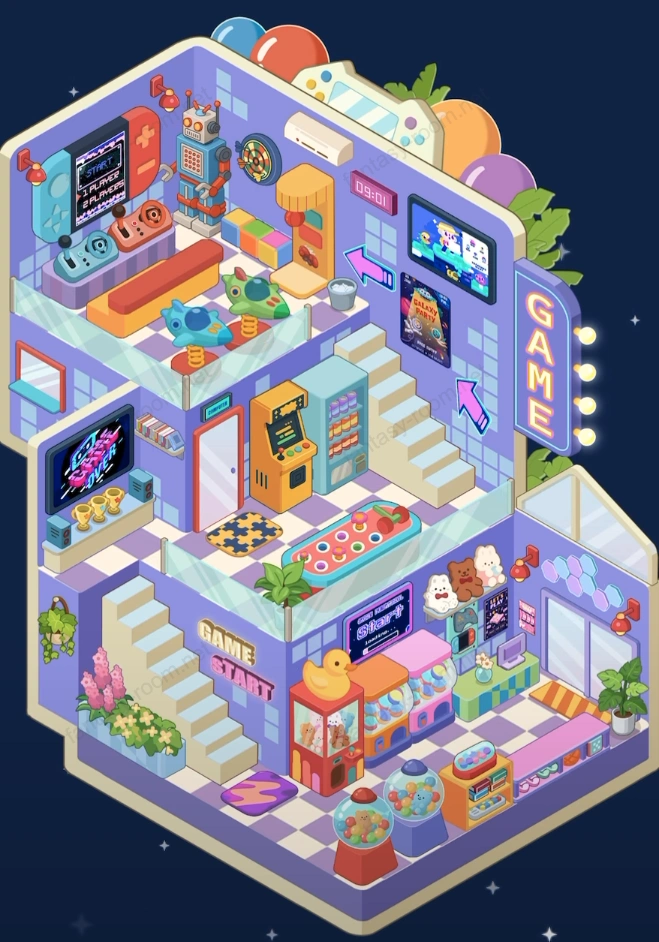
This level theme is colorful, tech-filled "Dreamy Gaming Center". Entire scene uses neon purple and bright orange as main color tones, matched with retro pixel style decorative elements, creating interactive entertainment space full of nostalgia and futuristic feeling. Players need to arrange two-story space into lively gaming heaven, including claw machines, arcade machines, game console area and neon light signs. Overall atmosphere youthful vitality, fun-filled, is one of most tech entertainment atmosphere levels in "Dreamy City Series". Keywords can include: gaming center, arcade games, claw machine, pixel style, neon light decoration, game theme room. - Fantasy Room Level 124 Strategy & Solutions
Important Notice
Due to level number adjustments in the app and different update progress between iOS and Android platforms, the text guide below may not match the images and videos above. Please prioritize images and videos. If you find that the guide content doesn't match your current level, please visit View All Level Walkthroughs to find the correct guide through images. Thank you for your understanding.
Dreamy Gaming Center composed of upper and lower two floors, bottom floor is claw machine and prize sales area, upper floor is console and arcade entertainment area. Space layout compact yet layered, color matching bright and eye-catching, detail decorations like light signs, screens, robots and trophies make overall atmosphere richer. Whether player area, display area or leisure area, all embellished with neon lights and game elements full of fun.
Step 1: Build purple gaming structure framework
Keep default two-story structure, adjust three-dimensional layout, making upper and lower floors layers distinct, overall presenting gaming building style.
Step 2: Arrange bottom floor game entrance and display area
Add "GAME START" text and decorative lighting at entrance position, laying gaming theme atmosphere.
Step 3: Install claw machine and capsule toy machine
Place red claw machine and capsule toy machine in bottom floor center, forming eye-catching core interactive point.
Step 4: Add candy machine and prize display cabinet
Place candy machine and display cabinet on both sides of entrance, adding leisure feeling and reward atmosphere of gaming hall.
Step 5: Place counter and exchange area
Set counter at lower right corner area, cooperate with light box, medals and posters, forming prize claiming service area.
Step 6: Arrange plants and decorative light signs
Place flower pots and neon arrow light signs at wall corners, making space more lively atmosphere.
Step 7: Set middle floor rest area and passage
Add sofa, carpet and beverage vending machine on middle floor, providing rest area for players.
Step 8: Place classic arcade and ball throwing machine
Place orange arcade and ball throwing machine on middle floor left side, making scene closer to real gaming hall experience.
Step 9: Adjust stairs and flow line connection
Let upper and lower stairs connect smoothly, ensuring player flow line clear and natural.
Step 10: Arrange upper floor console game area
Lay glass floor on top floor, place game console table and game controller chair, creating battle atmosphere.
Step 11: Set TV wall and game screen
Install large screen and pixel style TV on upper floor wall, displaying game screen and promotional images.
Step 12: Add robot and game display items
Place retro robot and trophy at upper floor corner, strengthening technology and achievement feeling.
Step 13: Hang neon lights and game logo signs
Decorate "GAME" luminous light sign on top, adding visual impact of night gaming hall.
Step 14: Add carpet and background light shadow
Lay colorful carpet on each floor, and adjust light shadow direction, making space more three-dimensional.
Step 15: Place game characters and decorative posters
Post pixel style game posters on wall, creating immersive visual effect.
Step 16: Decorate ceiling and outer wall top
Add colored balls and neon frame on building top, highlighting dreamy gaming theme.
Step 17: Optimize color and light layers
Strengthen light reflection, making blue-purple and orange-yellow form light-dark contrast, more tech feeling.
Step 18: Add character and interactive details
Place player and clerk images on different floors, making scene more life feeling and immersive feeling.
Step 19: Check equipment layout and proportion coordination
Ensure machines, stairs and decorations do not overlap, ensuring visual balance.
Step 20: Overall perfect and complete display
Adjust light brightness and color saturation, making entire gaming center full of dynamic light effects.
Tips
- •Lighting and reflection effects are visual focus of this level, appropriately increasing brightness can add neon feeling.
- •Upper and lower floor space should be clearly zoned, console area and arcade area each highlighted.
- •Game elements suggested to keep unified style, avoid too many mixed colors or realistic props.
Warnings
- ⚠Wall decoration should mainly blue-purple tone, avoid conflict with orange lighting.
- ⚠Claw machine and capsule toy machine position cannot be too dense, otherwise will compress space feeling.
- ⚠Top lighting suggested to slightly have gradient effect, to enhance dreamy gaming atmosphere.