Fantasy Room Level 126 - Highway Fast Food Restaurant
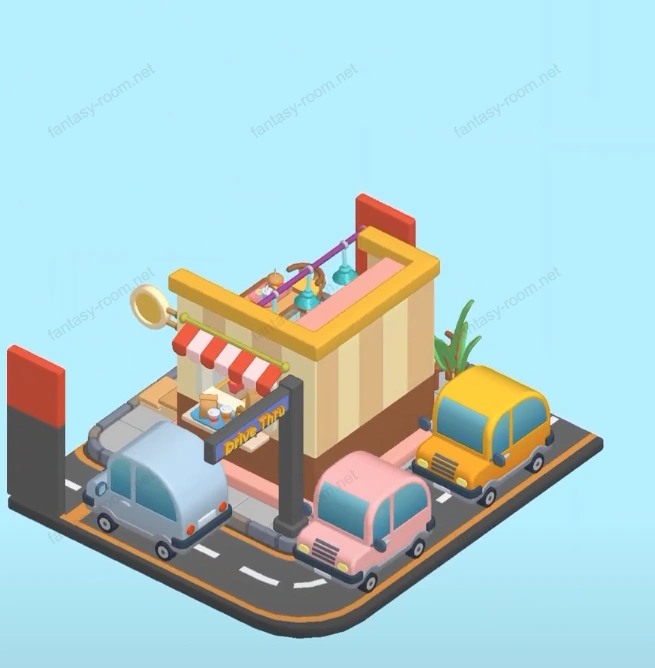
This level theme is "Highway Fast Food Restaurant", an open-air dining space full of modern urban rhythm and leisure atmosphere. Entire scene uses bright yellow, red and orange as main color tones, symbolizing speed and enthusiasm, combined with Drive Thru (car ordering channel) design, letting players experience comfort and warmth in fast-paced life. Through window outside road and vehicle design, entire space more like a 24-hour roadside burger shop. Keywords can include: fast food restaurant, Drive Thru, urban food, car restaurant, modern dining space, open-air rest area. - Fantasy Room Level 126 Strategy & Solutions
Important Notice
Due to level number adjustments in the app and different update progress between iOS and Android platforms, the text guide below may not match the images and videos above. Please prioritize images and videos. If you find that the guide content doesn't match your current level, please visit View All Level Walkthroughs to find the correct guide through images. Thank you for your understanding.
Highway Fast Food Restaurant overall is semi-open structure, left side is customer dining area, right side is kitchen and car channel area. Scene through details shows real modern dining layout: ordering counter, coffee machine, fried food area and takeout window all available. Warm color tone combined with soft light, creating fast-paced urban scene full of fireworks atmosphere.
Step 1: Build fast food restaurant main body framework
Keep default foundation structure, build yellow-red alternating roof and walls, forming highly recognizable brand appearance.
Step 2: Arrange ordering counter and cashier area
Set cashier counter, tray, beverage machine and french fries machine in central area, as core interactive area of entire space.
Step 3: Place coffee machine and beverage rack
Place coffee machine, beverage bottles and seasoning jars behind counter, creating rich dietary details.
Step 4: Add menu display board and lighting
Install ordering menu board and chandelier above, enhancing fast food restaurant atmosphere and visual layers.
Step 5: Arrange customer dining tables and chairs
Place round tables and high stools in left outdoor area, match desserts and beverage props, adding life atmosphere.
Step 6: Add Drive Thru channel structure
Set car channel sign and instruction board on right side, forming Drive Thru fast food restaurant characteristic.
Step 7: Place car and meal pickup window
Place blue car and takeout window, simulating real scene of customers picking up meals.
Step 8: Arrange outdoor decorations and plants
Add green plants and banana leaf decorations in corners, adding natural balance to space.
Step 9: Set floor tiles and road connection
Lay gray floor tiles and asphalt road surface, making fast food restaurant overall integrate into highway environment.
Step 10: Add meal and beverage details on tabletop
Place burgers, french fries, beverage cups and desserts, adding food layering to picture.
Step 11: Adjust lighting and color contrast
Enhance orange-yellow light effect, simulating warm street light atmosphere at dusk.
Step 12: Place signboard and advertising board at entrance
Add brand Logo and promotional ads at entrance area, making scene more commercial atmosphere.
Step 13: Optimize placement and visual flow line
Adjust tables, chairs and counter positions, ensuring visual balance and path smooth.
Step 14: Add background and distant view extension
Through road and driveway extension, making picture more spatial depth and realism.
Step 15: Refine kitchen area and cookware layout
Place fryer, bread machine and ingredient buckets in kitchen, reflecting busy yet orderly work atmosphere.
Step 16: Perfect tableware and plating details
Place trays, straws and condiments on tabletop, making details more complete.
Step 17: Add waiter and customer characters
Add character interaction, making picture more life feeling and dynamics.
Step 18: Adjust driveway shadow and light effect direction
Control light source direction, making car and signboard shadow naturally transition.
Step 19: Check overall layout proportion
Ensure car channel, dining area and counter space coordinated and reasonable, not crowded.
Step 20: Overall optimization and finishing display
Fine-tune lighting, meals and decoration positions, making entire scene bright and vivid, presenting lively fast food restaurant appearance.
Tips
- •Lighting and color matching are key of this level, orange-yellow-red three color proportion should control at 4:3:2, keeping visual balance.
- •Drive Thru channel and dining area should distinguish clearly, avoid visual conflict.
- •Tabletop meals suggested diversification, such as burgers, french fries, beverages combination, can enhance realism.
Warnings
- ⚠Car placement angle should be consistent with road direction, avoid clipping or blocking.
- ⚠Lighting should not be too bright, otherwise will affect picture soft atmosphere.
- ⚠Outdoor tables and chairs suggested staggered placement, enhancing space layers and visibility.