Fantasy Room Level 185 - City Fire Station
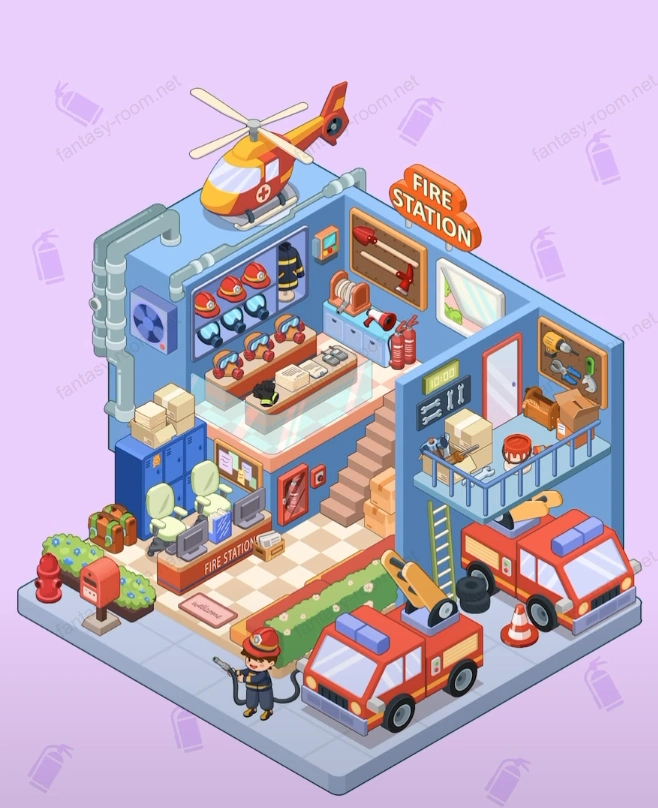
Level 185 theme is "City Fire Station", is a modern rescue center full of sense of security and vitality. Overall color matching mainly blue and red, symbolizing professionalism and enthusiasm, matching fire trucks, helicopters, fire uniforms and firefighting equipment, forming an orderly and tense emergency command space. Players need to reasonably arrange equipment areas and duty channels, creating an efficient, tidy and full of heroic atmosphere firefighting scene. SEO keywords recommend: fire station level, rescue theme arrangement, firefighter base, fire station design, firefighting scene strategy, safety theme game, emergency rescue simulation. - Fantasy Room Level 185 Strategy & Solutions
Important Notice
Due to level number adjustments in the app and different update progress between iOS and Android platforms, the text guide below may not match the images and videos above. Please prioritize images and videos. If you find that the guide content doesn't match your current level, please visit View All Level Walkthroughs to find the correct guide through images. Thank you for your understanding.
This level focus is expressing theme of "safety and speed". Players need to display rigorous order of firefighting work in limited space, from vehicle duty to equipment reserves, from command center to air support, all need reasonable layout and compact structure, making entire scene both real and visually impactful.
Step 1: Determine main structure and functional areas
Divide space into three main parts: lower floor duty area (fire trucks and command desk), middle floor office and equipment area, upper floor helicopter platform. Layout emphasizes clear hierarchy, reflecting completeness of rescue system.
Step 2: Place two fire trucks forming main viewpoint
At bottom front park two red fire trucks side by side, ensuring direction facing outward, representing rescue state of being ready at any time. Beside trucks can place traffic cones and fire hydrants.
Step 3: Add duty area details and equipment reserves
Behind fire trucks place hose reels, first aid kits and oxygen tanks, showing equipment completeness. Ground can lay warning lines or rescue channel lines enhancing scene atmosphere.
Step 4: Set command and reception desk
At entrance place “FIRE STATION ” front desk, equipped with computer, walkie-talkie and file rack. On desk can place task files or radio equipment, for dispatch commands.
Step 5: Arrange staircase and passage to second floor
Staircase located at right side, connected with command desk, ensuring rescue personnel can quickly go upstairs. Under staircase can place fire extinguishers and storage boxes, fully utilizing space.
Step 6: Create equipment display and training area
Second floor center set equipment racks, display helmets, fire suits and flashlights and other items. Wall paste duty flow chart or fire warning signs, enhancing sense of reality.
Step 7: Arrange office and duty area
Second floor right side place office desk, chairs and file cabinets, wall hang city map or duty record board, showing firefighter daily management work.
Step 8: Add helicopter landing platform
Top floor place red-yellow helicopter, representing air rescue power. Beside can arrange communication antennas and wind indicators, reflecting professional details.
Step 9: Strengthen ventilation and pipeline structure
Left side add ventilation pipes and exhaust equipment, matching metal gray appearance, making building more industrial texture.
Step 10: Install lighting and safety signs
For each floor configure independent lighting, entrance and staircase add “EXIT” signs. Lighting mainly warm white, focus illuminating vehicles and equipment areas.
Step 11: Place firefighter characters
On ground duty area arrange a neatly dressed firefighter, holding water gun or walkie-talkie, reflecting task execution scene.
Step 12: Arrange training and drill scenes
In empty corners place roadblocks and fire buckets, creating training state, increasing interaction feeling and storytelling.
Step 13: Decorate external environment and greening
Around building can place low green plants and fences, making fire station environment more life atmosphere, reducing overall industrial cold feeling.
Step 14: Balance visual focus and space color matching
Use blue-gray walls setting off red firefighting equipment, making picture both stable and vivid. Pay attention to coordination of upper and lower floor visual proportion, avoiding excessive concentration.
Step 15: Perfect signs and detail text
On building exterior wall add “FIRE STATION” signboard and number, making entire scene more recognizable.
Step 16: Add storage and emergency items
Second floor corner place cardboard boxes, oil drums and spare parts racks, showing daily logistics supply area.
Step 17: Optimize channel width and dynamic space
Ensure space between vehicles, stair entrance and passage area is spacious and reasonable, forming natural movement line layout, convenient for firefighters rapid action.
Tips
- •Red area should be concentrated in vehicles and signs parts, avoiding excessive use causing visual fatigue.
- •Equipment display hierarchy should be clear, helmets, tools and protective suits should be placed in layers.
- •Helicopter platform should not be too close to edge, otherwise will weaken building focus feeling.
Warnings
- ⚠Ground passage should maintain clear, avoiding decorations blocking vehicle movement lines.
- ⚠Office area and equipment area should have obvious boundaries, preventing space confusion.
- ⚠Overall lighting should be even, avoiding dark corners affecting overall viewing experience.